Sending funds privately
Bob needs to pay his subcontractor, Charlie, who also uses Curvy for the services he provided.
Charlie has a registered Curvy ID: charlie.curvy.name
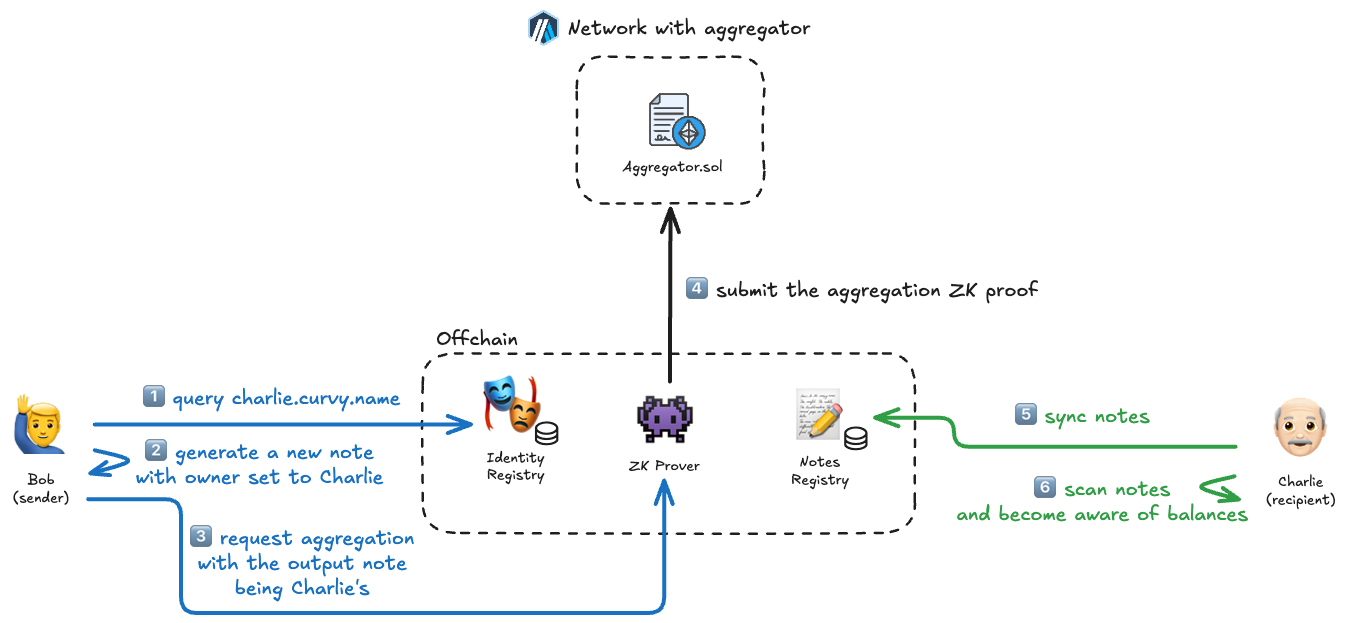
Steps explained in detail
🔵 Bob
- Bob queries charlie.curvy.name in the identity registry, fetching Charlie's public keys
- Using the Curvy SDK, a new note is created for which Charlie is the owner. This information is hidden from everyone except Bob and Charlie.
- Aggregation is requested so that Bob's notes are spent, and a new output note owned by Charlie is created, essentially using the aggregation process for transferring funds.
⚫ Curvy
- Using the supplied notes and ownership proofs, the ZK Prover generates a new aggregation proof and submits it on-chain.
🟢 Charlie
- Some time later, after logging into the Curvy App, new notes are synced
- Simultaneously, notes are scanned for ownership by Charlie, and a new balance is detected.
IMPORTANT
Although this is the simplest process in Curvy, it is also the most private, as the exact: amount, currency, sender and recipient are completely hidden from the public eye.